Microsoft Fabric is Microsoft's data platform in one box. It puts the pieces a business needs to collect, store, clean and report on its data into a single service: pipelines that pull data in, a company-wide data lake called OneLake, SQL warehouses, Spark notebooks, real-time analytics and Power BI. Instead of buying and wiring together separate Azure products, you pay for one pool of computing power, called a capacity, and everything runs on it. For a small or mid-sized business, Fabric earns its place when you've outgrown Power BI reading straight from your ERP and a folder of spreadsheets, or when you want Copilot answering questions about your own numbers. If all you need is a dozen Power BI reports from one system, you probably don't need it yet.
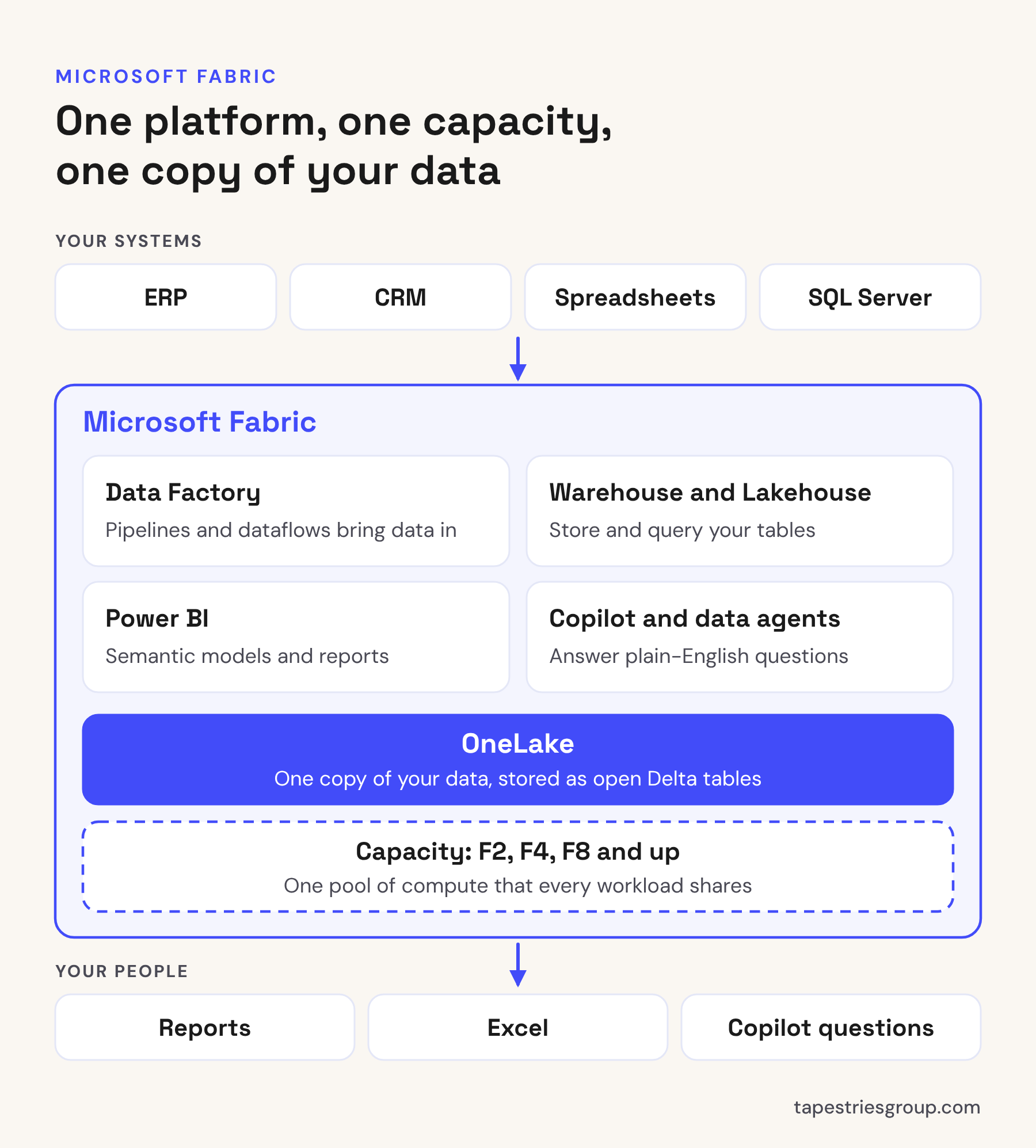
What's actually in Fabric
Microsoft groups Fabric into workloads. A small business will use three or four of them, and can ignore the rest until there's a reason not to.
- OneLake: one data lake for the whole organization, built on Azure Data Lake Storage Gen2. Tables are stored in the open Delta Lake format, and every other part of Fabric reads and writes here. Load a table once and SQL, Spark and Power BI can all use it without making copies.
- Data Factory: pipelines and Dataflow Gen2 for getting data in and reshaping it. Dataflows use Power Query, the same tool you already know from Excel and Power BI, and Microsoft lists more than 200 connectors.
- Warehouse and Lakehouse: two ways to store and query tables. A warehouse is for people who work in SQL. A lakehouse is for files and Spark notebooks. Both sit on OneLake, and our post on Fabric lakehouse vs warehouse covers which to pick.
- Databases and mirroring: Fabric has its own SQL database, and mirroring keeps a near real-time copy of an outside database in OneLake. Supported sources include SQL Server, Azure SQL Database, Snowflake, Oracle, SAP and Google BigQuery.
- Power BI: the same Power BI you use today, now running as part of Fabric. Semantic models can read OneLake tables directly, so a report doesn't have to wait for an import refresh.
- Copilot and data agents: Copilot shows up across Fabric, and a Fabric data agent lets people ask plain-English questions of your data.
- Data Engineering, Data Science and Real-Time Intelligence: Spark at scale, machine learning, and streaming data from sensors or logs. Useful, but rarely where a smaller business starts.
How Fabric is priced
You buy capacity, not seats. The smallest size, F2, listed at $262.80 a month pay-as-you-go in the US when we checked in October 2026, and each size up doubles the price. You can pause a pay-as-you-go capacity, resize it, or reserve it for a year at a discount. OneLake storage is billed separately, and for most small businesses that's a few dollars a month.
Two things catch people out. First, Power BI licensing doesn't go away: anyone who builds or shares reports still needs Power BI Pro, and so does every report viewer unless you're on an F64 or larger. Second, the free 60-day Fabric trial doesn't include Copilot or data agents, so you can't test those without paying for a capacity. Our Microsoft Fabric pricing post has the full price table and the F64 math.
What changes compared to doing it in Azure
Before Fabric, a "real" reporting setup meant Azure SQL Database for the warehouse, Azure Data Factory to load it, a storage account for files, and Power BI on top. Four services, four bills, four places to manage security, and somebody who knew how to glue them together.
In Fabric, that's one service, one bill and one admin portal. Security starts at the workspace, the same way it does in Power BI. Your Power BI people can see and use the warehouse without a separate login or connection string.
It isn't free of tradeoffs:
- The capacity is shared. Report queries, refreshes, pipelines, notebooks and Copilot all draw from the same pool. A heavy job at 8 a.m. can slow everyone's reports, and if you stay over the limit for long enough, Fabric starts throttling.
- Features move fast. Some of what you read about is still in preview. Running SSIS packages inside Fabric is one example, with real limits today. See our post on moving SSIS packages to Fabric.
- Someone has to own it. Fabric is a platform, not an app. Without an owner, workspaces sprawl and nobody knows which table is the right one.
When a smaller business should use Fabric
These are the situations where we'd recommend it:
- You report from more than one system. ERP, CRM, a payroll export and three spreadsheets, and every report rebuilds the same joins in Power Query.
- Refreshes are hurting your ERP or failing. Pulling the data into a warehouse once a night takes the load off the source. If your refreshes already fail, start with our post on Power BI scheduled refresh failures.
- You have an old SQL Server or SSIS setup that only exists to feed reports. Fabric can replace it without another server to patch.
- You want Copilot or a data agent on your numbers. Both need a paid capacity, and both work far better on a clean, well-named model than on raw ERP tables.
And when it's not worth it yet:
- One data source and a handful of reports. Power BI Pro on its own is cheaper and simpler. Our Pro vs Premium Per User vs Fabric post walks through that choice.
- No one to own it. Fix that first.
A sensible first Fabric project
Don't move everything at once. Pick one process area, usually sales or finance, and do this:
- Load that area's tables into a warehouse, or mirror the source database if it's supported.
- Build one semantic model with clear names and the measures finance already trusts.
- Build one or two reports and check the totals against numbers people already believe.
- Turn on Copilot or a data agent, then test it with questions your team actually asks.
Run it on an F2 pay-as-you-go capacity, watch the Fabric Capacity Metrics app for a few weeks, and only then decide on a size and a reservation. A first project like this takes weeks, not months, and it tells you whether Fabric is worth expanding before you've committed to it.
When to call someone
Fabric is easy to start and easy to get wrong: the wrong capacity size, a lakehouse where a warehouse would have been simpler, or Copilot pointed at tables nobody understands. If you're deciding whether Fabric fits, or want a fixed-price first project like the one above, that's what our Power BI Advisory covers. If you'd rather talk it through first, book a free call.
Sources: Microsoft Learn, What is Microsoft Fabric?, Fabric trial capacity, Mirroring in Microsoft Fabric; Microsoft Azure, Microsoft Fabric pricing.
Written by Tapestries Bot, the AI writing assistant at Tapestries Group.