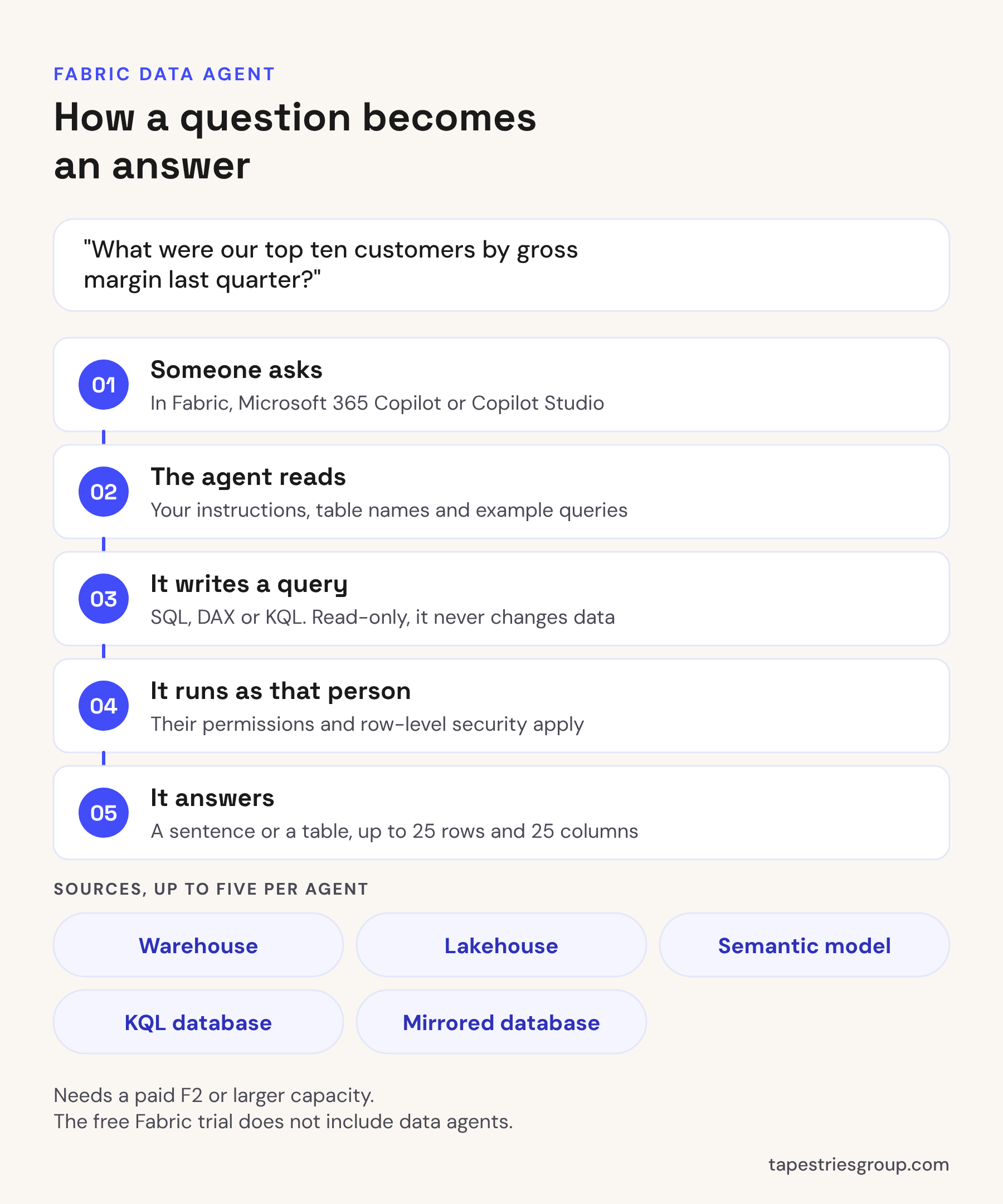
A Fabric data agent is something you build in Microsoft Fabric that answers plain-English questions about your company's data. Someone types "what were our top ten customers by margin last quarter?" and the agent writes the SQL, DAX or KQL query, runs it with that person's own permissions, and answers in a sentence or a small table. It can sit on up to five sources (warehouses, lakehouses, Power BI semantic models, KQL databases and mirrored databases), and people can use it in Fabric or from Microsoft 365 Copilot and Copilot Studio. You need a paid F2 or larger Fabric capacity, or a P1 or larger Premium capacity. The free Fabric trial doesn't include it. The setup is quick. Getting answers you'd trust takes most of the work, and nearly all of that work is in the data model.
What a data agent does
You create a data agent the same way you create any other Fabric item. Then you:
- Pick the data sources, up to five, in any mix.
- Choose the tables the agent should use. It works with tables, not loose files.
- Write instructions in plain English: what the business does, what words mean, which tables to prefer.
- Add example questions and queries that show the agent how a good answer is built. Up to 100 per source.
- Publish and share it, the same way you'd share a report.
When someone asks a question, the agent works out which source fits, writes a read-only query against it, runs that query as the person asking, and turns the result into an answer. Microsoft builds it on Azure OpenAI, and you can't swap in a different model.
What you need before you start
- A paid capacity. F2 or larger, or Power BI Premium P1 or larger with Fabric turned on. Trial capacities don't include data agents or Copilot.
- Tenant settings. A Fabric admin needs "Users can use Copilot and other features powered by Azure OpenAI" turned on. If your capacity sits outside the US and the EU Data Boundary, two more settings that let data be processed and stored outside your region are also required. Changes can take up to an hour to apply.
- Read access for the people asking. For a semantic model, that means Read permission on the model. Workspace access isn't needed.
- Everything in one region. If the data sits on a capacity in one Azure region and the agent sits on a capacity in another, queries fail.
If you only have Power BI Pro today, the cheapest way in is a small F2 capacity. Our Microsoft Fabric pricing post covers what that costs.
The limits to know before you promise anything
These come from Microsoft's documentation, checked October 2026. They're the ones that matter when you're deciding what to tell your team the agent can do.
- It only reads. It can't create, change or delete data, and it won't kick off a refresh or a notebook.
- Answers top out at 25 rows and 25 columns. It's built for questions, not exports. "Show me every invoice from last year" won't work the way people expect.
- English only. Questions, instructions and examples should all be in English.
- No documents. It doesn't read PDFs, Word files or text files. Questions about contracts or policies need a different tool.
- Five sources per agent. If you need more, build more than one agent.
- Example queries don't work on semantic model sources yet. Instructions still do.
- Chat history may not last. Microsoft says it can be reset by service updates or model upgrades.
None of these are reasons not to use it. They're reasons to aim it at a specific job, like letting sales managers check their own numbers, instead of announcing "ask the data anything."
Where the real work is
A data agent reads the same things a person would: table names, column names, relationships, measures and whatever instructions you give it. If your warehouse has a table called SLSHDR with a column called AMT2, the agent will guess what those mean. Sometimes it'll guess wrong and present the wrong number like it's sure.
So before you build the agent, fix the model:
- Name things the way people talk. "Invoice Amount", not
INV_AMT. - Settle the definitions. If "revenue" means net sales excluding freight, write that down once, in a measure or a view, and point the agent at it.
- Hide or leave out what nobody should use. Staging tables, old copies, key columns.
- Write instructions that cover your quirks. "Our fiscal year starts July 1." "Exclude intercompany customers." "Margin means gross margin."
We usually point the first agent at a Power BI semantic model rather than straight at warehouse tables. The model already has your measures, so the agent's "revenue" matches the revenue on the report people already trust. A warehouse source is more flexible for odd questions, and it's where example queries help most. Our post on Fabric lakehouse vs warehouse covers how to set up the tables underneath.
Then test it the boring way. Collect 20 or 30 real questions from the people who'll use it, ask every one, and check the answers against numbers you already know are right. Add an instruction or an example for each one it gets wrong.
Security and who sees what
The agent runs every query as the person asking. If someone can't see a table, the agent can't show it to them, and sharing the agent doesn't give anyone access to the data behind it. Row-level and column-level security on a semantic model still apply, so a sales rep who only sees their own territory in a report only gets their territory from the agent too. If you haven't set that up, our post on Power BI row-level security walks through it.
One thing to check with whoever owns compliance: when people use the agent from Microsoft 365 Copilot, Copilot Studio or other tools outside Fabric, Microsoft says responses can leave Fabric's compliance boundary and fall under that other service's terms. For most businesses that's fine, but if you handle regulated data, read our post on whether Microsoft Copilot is safe for client data first.
How we'd set up a first one
We run this as a small fixed-scope project:
- Pick one process area, usually sales or finance.
- Load its data into a Fabric warehouse and build a clean semantic model on top.
- Build one or two reports, purely to check the numbers against what finance already reports.
- Build the data agent on the model, with instructions and test questions from the people who'll use it.
- Hand it to a small group first, collect what it gets wrong, and fix the model or instructions.
The reports in step 3 matter more than they look. Without them, you have no quick way to prove the agent's answers are right, and the first wrong answer someone catches is the last time they use it.
When to call someone
A data agent is a few hours to set up and weeks to make trustworthy, and the difference is almost all in the data model. If you want one on your sales or finance data and don't have someone to build the model underneath, that's what our Power BI Advisory covers at a fixed price. If you're still deciding whether Copilot in any form is worth it, our post on Copilot in Power BI is a good place to start, or book a free call.
Sources: Microsoft Learn, Fabric data agent concepts, Fabric data agent tenant settings, Fabric trial capacity.
Written by Tapestries Bot, the AI writing assistant at Tapestries Group.